Best WiFi 6 Routers Under $150 (2026)
⚠️ Price notice: Prices shown are approximate and subject to change. Always check Amazon for the current price before purchasing.
We may earn a commission from qualifying purchases made through our Amazon links. Disclosure.
The top home WiFi 6 routers for fast, reliable coverage — compared for real-world speed, range, setup simplicity, and performance in apartments and larger homes.
WiFi 6 (802.11ax) is now the standard for home networking, and in 2026 you no longer need to spend $200+ to get a genuinely capable router. The best sub-$150 WiFi 6 routers offer multi-gigabit speeds, reliable coverage for 3-4 bedroom homes, and features like WPA3 security, OFDMA, and MU-MIMO that meaningfully improve network performance when multiple devices are connected simultaneously. This guide covers the best options for apartments, houses, and tech-savvy households at every budget.
What to look for
WiFi 6 vs. WiFi 6E
WiFi 6 (2.4GHz + 5GHz) covers the vast majority of home needs. WiFi 6E adds a 6GHz band for less interference and higher speeds on newer devices, but very few devices support it yet. For most homes in 2026, WiFi 6 is the right choice at this price range.
Coverage Area
Apartments and small homes (under 1,500 sq ft) work fine with a single router. Larger homes (2,000–3,500 sq ft) need either a router with high-gain antennas or a mesh system. Multi-story homes benefit most from mesh systems where nodes can be placed on each floor.
Number of Connected Devices
A typical household in 2026 has 20-30 connected devices — phones, laptops, TVs, smart home devices, game consoles. OFDMA and MU-MIMO (standard in WiFi 6) dramatically improve performance when many devices are active simultaneously. Look for routers rated for 50+ devices.
Security Features
WPA3 encryption is the current security standard and should be non-negotiable. Automatic firmware updates, guest network support, and optional DNS-based content filtering add meaningful protection. Avoid routers from brands with histories of security vulnerabilities and slow patch response.
Setup and App Experience
Mobile app setup has replaced difficult web interfaces for most modern routers. Look for apps with clear network monitoring, device prioritization (QoS), and parental controls. TP-Link's Tether app and ASUS's ASUS Router app are both consistently rated as best-in-class for setup and management.
Our top picks
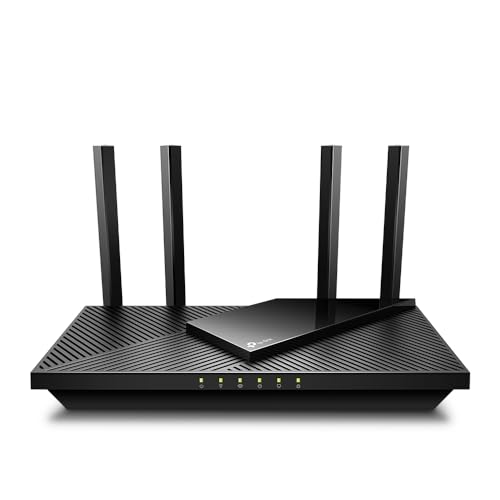
TP-Link Archer AX21 (AX1800)
⭐ 4.5 (65,000+ reviews)
The TP-Link Archer AX21 is the most popular affordable WiFi 6 router, and its review count alone speaks to reliability. AX1800 dual-band speeds (1,200Mbps on 5GHz + 574Mbps on 2.4GHz) handle 4K streaming, gaming, and video calls simultaneously without congestion. OFDMA and 1024-QAM make the actual throughput improvements real, not just theoretical. For apartments and small homes, this is the rational buy.
⭐ Why we pick this: 65,000+ reviews and consistent 4.5 stars isn't luck — the AX21 simply works reliably for the 90% of home users who need solid WiFi 6 performance without spending $100+.
Pros
- ✓WiFi 6 AX1800 — genuine next-gen speeds for the price
- ✓OFDMA for better multi-device performance
- ✓OneMesh compatible — add TP-Link extenders seamlessly
- ✓WPA3 security standard
- ✓TP-Link Tether app for easy management
- ✓3-year warranty
Cons
- ✗No WiFi 6E (6GHz band)
- ✗2 LAN ports only (most routers have 4)
- ✗Basic QoS controls compared to ASUS
- ✗Coverage limited to ~1,500 sq ft
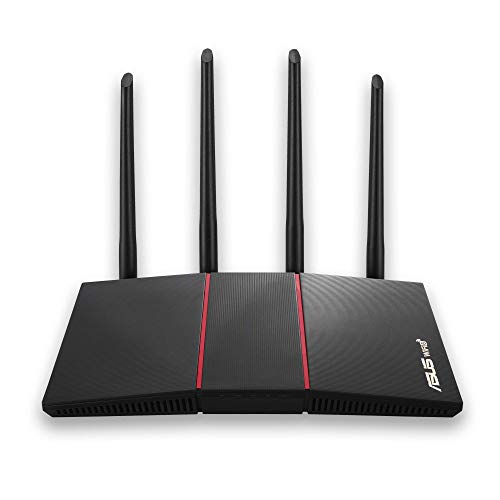
ASUS RT-AX55 (AX1800)
⭐ 4.5 (18,000+ reviews)
The ASUS RT-AX55 offers AX1800 performance with the reliability and advanced feature set that ASUS is known for. The ASUS Router app provides professional-grade network monitoring, detailed device management, and genuine QoS traffic prioritization. AiProtection security — powered by Trend Micro — provides real-time network protection at no additional cost. For users who want more control than TP-Link's simplified interface provides, ASUS is the right choice.
⭐ Why we pick this: AiProtection network security powered by Trend Micro at no extra cost, combined with ASUS's best-in-class router app for detailed network management, makes this the right choice for users who want more than basic connectivity.
Pros
- ✓AiProtection by Trend Micro — free network security
- ✓ASUS Router app with detailed device management
- ✓True QoS traffic prioritization for gaming and streaming
- ✓4 LAN ports (vs. 2 on most budget routers)
- ✓Lifetime free security updates
- ✓ASUS Instant Guard for secure browsing on any network
Cons
- ✗More complex setup than TP-Link for non-technical users
- ✗AX1800 — same tier as the cheaper AX21
- ✗Larger physical footprint
- ✗No USB port for network storage
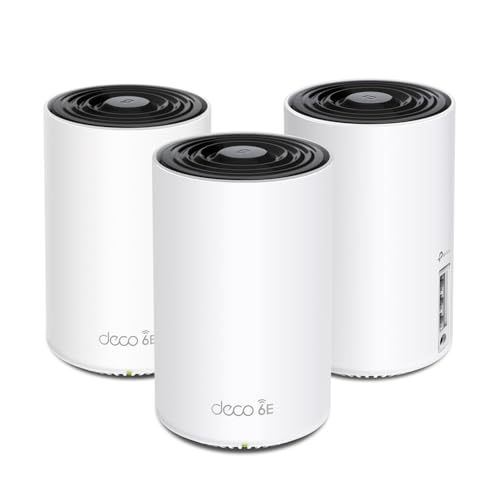
TP-Link Deco XE75 Mesh WiFi 6E (2-Pack)
⭐ 4.5 (8,000+ reviews)
The Deco XE75 2-pack covers up to 5,500 sq ft with WiFi 6E tri-band performance — the 6GHz band provides a dedicated backhaul between mesh nodes, eliminating the bandwidth sharing that slows down traditional mesh systems. For multi-story homes or large apartments with dead zones, the two-node Deco system outperforms any single router at this price. Easy app setup takes under 10 minutes per node.
⭐ Why we pick this: A dedicated 6GHz backhaul between mesh nodes is the feature that makes this meaningfully better than cheaper mesh systems — it eliminates the bandwidth penalty of traditional mesh and maintains full speed throughout the house.
Pros
- ✓5,500 sq ft coverage with 2 nodes
- ✓Tri-band WiFi 6E — dedicated 6GHz backhaul channel
- ✓Seamless roaming between nodes
- ✓OneMesh compatible with TP-Link extenders
- ✓10-minute app setup per node
- ✓WPA3 and automatic security updates
Cons
- ✗6GHz client devices still uncommon in 2026
- ✗Larger node footprint than Eero competitors
- ✗Requires TP-Link account for full feature access
- ✗Single Ethernet port per node (no link aggregation)

Amazon Eero 6+
⭐ 4.4 (12,000+ reviews)
The Eero 6+ is the simplest WiFi 6 router to set up and manage, bar none. The Eero app walks you through installation in under 5 minutes, provides intuitive parental controls, and integrates directly with Alexa for voice-controlled network management. The built-in Zigbee smart home hub means compatible smart devices connect directly to the router without needing a separate hub. For Amazon ecosystem households, it's the seamless choice.
⭐ Why we pick this: The built-in Zigbee hub that eliminates the need for a separate smart home hub, combined with genuinely the simplest setup and management app available, makes this the natural choice for Amazon smart home households.
Pros
- ✓Simplest setup experience available — under 5 minutes
- ✓Built-in Zigbee hub for smart home devices
- ✓Alexa-native voice controls
- ✓Parental controls via Eero app
- ✓Auto-updates security and firmware
- ✓Mesh-expandable with additional Eero nodes
Cons
- ✗Eero Secure+ ($10/month) required for advanced features
- ✗Less advanced settings than ASUS or TP-Link
- ✗Amazon account required
- ✗Single Ethernet port limits wired device connections

TP-Link Archer AX3000 (AX3000)
⭐ 4.5 (22,000+ reviews)
The TP-Link Archer AX3000 steps up from the AX21 with AX3000 speeds (2,402Mbps on 5GHz), a USB 3.0 port for network storage, and 4 Gigabit LAN ports. OFDMA, MU-MIMO, and Beamforming combine to maintain strong signal quality even when 30+ devices are connected simultaneously. OneMesh support allows seamless expansion with TP-Link extenders as your home grows.
⭐ Why we pick this: AX3000 speeds, a USB 3.0 port for network-attached storage, and 4 Gigabit LAN ports at $90 is the complete feature set that most users will max out before needing to upgrade — the right long-term buy at this budget.
Pros
- ✓AX3000 — 2,402Mbps on 5GHz for demanding households
- ✓USB 3.0 port for network-attached storage
- ✓4 Gigabit LAN ports
- ✓OFDMA + MU-MIMO for 50+ devices
- ✓Beamforming for targeted signal strength
- ✓OneMesh compatible for seamless expansion
Cons
- ✗No WiFi 6E
- ✗App is less feature-rich than ASUS Router app
- ✗External antennas may not suit minimalist setups
- ✗Coverage area rated for ~2,500 sq ft
Our verdict
For apartments and small homes, the TP-Link AX21 at $55 is the rational buy — proven reliability, genuine WiFi 6 performance, and no unnecessary spending. Users who want better network control and free security protection should spend $75 on the ASUS RT-AX55. Larger homes with dead zones need the TP-Link Deco XE75 mesh system at $140. Amazon ecosystem users will appreciate the Eero 6+'s seamless Alexa and smart home integration. The AX3000 at $90 is the best single-router upgrade for demanding households with many wired and wireless devices.
Frequently asked questions
What is the best WiFi 6 router under $150?
Is WiFi 6 worth upgrading to?
What is the difference between a router and a mesh WiFi system?
How often should I replace my WiFi router?
Prices may vary. Check Amazon for current pricing.