Best Laptops for College Students Under $600 (2026)
⚠️ Price notice: Prices shown are approximate and subject to change. Always check Amazon for the current price before purchasing.
We may earn a commission from qualifying purchases made through our Amazon links. Disclosure.
The top laptops for college students in 2026 — balancing performance, battery life, build quality, and value at every budget level from $330 to $600.
Finding the right college laptop is about striking the right balance: enough performance for coursework and occasional projects, a battery that survives a full day of lectures without hunting for outlets, and a build quality that'll handle 3-4 years of backpack transport. In 2026, you can get all three without spending more than $600. Whether you're an engineering student who needs processing power or a humanities student who just needs reliable Word and browser performance, there's a right laptop for your specific situation on this list.
What to look for
Battery Life
Aim for 10+ hours of real-world use. Manufacturer specs are often 20-30% optimistic — look for independent review battery tests. Going all day without a charger is a genuine quality-of-life difference in lecture halls.
Processor
AMD Ryzen 5 or Intel Core i5 (12th gen or newer) are the minimum for smooth multitasking with Chrome, Zoom, and Office open simultaneously. Avoid Intel Celeron or Pentium processors — they're outdated even in budget laptops.
RAM
8GB is the absolute minimum; 16GB is strongly recommended. Students running Chrome (which is memory-hungry), Zoom, Office, and Spotify simultaneously will feel the difference. Upgrading later is sometimes impossible, so choose wisely.
Storage
256GB SSD is the minimum; 512GB is much more comfortable for files, photos, downloaded course materials, and apps. An SSD is non-negotiable over an HDD — it's the single biggest speed difference in everyday use.
Display
1080p IPS minimum. Larger than 15.6" is hard to carry daily; smaller than 13" is cramped for long writing sessions. A bright display (300+ nits) matters for outdoor and window-adjacent use.
Our top picks

Lenovo IdeaPad Flex 5 (16-inch AMD)
⭐ 4.4 (8,000+ reviews)
The IdeaPad Flex 5 offers more display real estate than most competitors at this price — a 16-inch 1920×1200 IPS touchscreen with a 2-in-1 design. The AMD Ryzen 5 processor handles coursework comfortably, and 16GB RAM in higher-end configurations avoids the memory crunch students often hit mid-semester when project files pile up.
⭐ Why we pick this: A 16-inch 2-in-1 touchscreen with AMD Ryzen 5 at $550 gives students more productive screen real estate than any competitor at this price — the 360° hinge adds genuine flexibility for lecture note-taking and reading.
Pros
- ✓Large 16-inch display — more productive for multi-window work
- ✓2-in-1 touchscreen with 360-degree hinge
- ✓AMD Ryzen 5 performance for smooth multitasking
- ✓16GB RAM configs available
- ✓USB-C charging from any compatible charger
- ✓Backlit keyboard for late-night study sessions
Cons
- ✗Heavier than 14-inch alternatives at ~4.4 lbs
- ✗Webcam quality is average (720p)
- ✗No discrete GPU — not for gaming or 3D work
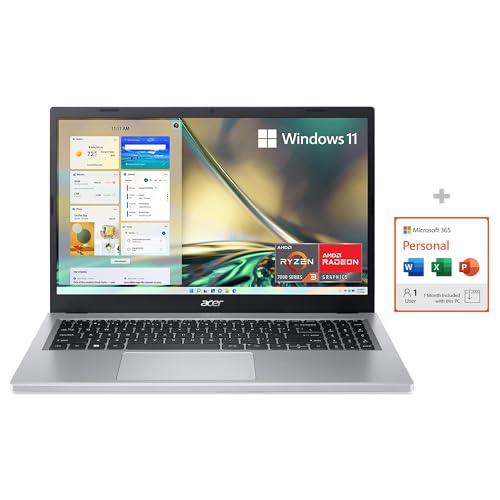
Acer Aspire 5
⭐ 4.3 (12,000+ reviews)
The Acer Aspire 5 series is the most consistently recommended value laptop at every price point, year after year. For $380-450, you get a solid AMD Ryzen 5 or Intel Core i5 processor, 8-16GB RAM, and a 15.6-inch FHD IPS display. Build quality is good for the price, and the keyboard is one of the comfortable budget keyboards available.
⭐ Why we pick this: Three consecutive years as the top value laptop recommendation — the Aspire 5 hasn't lost its position because nothing else consistently matches its price-to-performance ratio at this price point.
Pros
- ✓Best price-to-performance ratio in the budget laptop category
- ✓Comfortable keyboard — one of the best at this price
- ✓AMD Ryzen 5 or Intel Core i5 configurations available
- ✓FHD IPS display with good color accuracy
- ✓Multiple ports: USB-A, USB-C, HDMI, SD card
- ✓Upgradeable RAM and storage in many configurations
Cons
- ✗Battery life averages 7-8 hours (less than marketed)
- ✗Plain, utilitarian aesthetic
- ✗8GB RAM configs feel limiting with heavy browser use

ASUS VivoBook 15
⭐ 4.3 (10,000+ reviews)
The ASUS VivoBook 15 is lighter than most 15-inch competitors — about 3.7 lbs — without sacrificing screen size. The ErgoLift hinge design tilts the keyboard upward by a few degrees when the screen is opened, improving typing comfort and airflow for better thermal performance. Build quality is noticeably better than similarly-priced Acer options.
⭐ Why we pick this: The ErgoLift hinge that angles the keyboard as you open the lid is a subtle detail that reduces wrist fatigue during long writing sessions — at 3.7 lbs it's also among the lightest 15-inch laptops at any price under $450.
Pros
- ✓Lighter than comparable 15-inch laptops at 3.7 lbs
- ✓ErgoLift hinge improves keyboard angle and airflow
- ✓Narrow bezels make it feel modern
- ✓Strong AMD Ryzen performance
- ✓Good keyboard with comfortable key travel
- ✓Multiple USB ports including USB-C
Cons
- ✗Display brightness could be higher for outdoor use
- ✗Audio quality is weak even for a laptop
- ✗Fan noise is audible under sustained load

HP 14 Laptop (Intel Core i5)
⭐ 4.2 (20,000+ reviews)
For students who primarily need a reliable machine for documents, web research, video calls, and streaming — not video editing or software development — the HP 14 is a well-priced, dependable option. HP's build quality and customer support infrastructure make this a safe first-laptop choice, and the Intel Core i5 configuration handles everyday tasks without sluggishness.
⭐ Why we pick this: HP's customer support network and long-term reliability record make this the safest first laptop for students who can't afford downtime — always choose the Core i5 and 8GB RAM configurations.
Pros
- ✓Affordable entry point at ~$330-380
- ✓Reliable HP build quality and support
- ✓Lightweight at 3.4 lbs — easy to carry daily
- ✓720p webcam adequate for video calls
- ✓Windows 11 Home included
- ✓Available in configurations with 8GB RAM
Cons
- ✗Core i3 configurations are underpowered — choose i5
- ✗Avoid 4GB RAM configs — upgrade to 8GB minimum
- ✗14-inch display can feel cramped for multi-window work
- ✗Battery life is average at 7-9 hours

Microsoft Surface Go 3
⭐ 4.3 (9,000+ reviews)
The Surface Go 3 targets students who want a tablet-first experience with genuine Windows flexibility. The 10.5-inch PixelSense display is sharper and more accurate than any other display on this list. It's ideal for annotating PDFs, sketching diagrams, and handwriting notes with the Surface Pen (sold separately). For students in architecture, design, nursing, or any field with heavy annotation, it's worth the premium.
⭐ Why we pick this: The PixelSense display and Surface Pen transform PDF annotation into a genuinely productive activity — worth the premium specifically for nursing, architecture, or design students who annotate course materials constantly.
Pros
- ✓Stunning PixelSense 10.5-inch touchscreen — best display on this list
- ✓Compact and ultra-light — fits anywhere in a bag
- ✓Premium magnesium build quality
- ✓Windows 11 Pro available in education bundles
- ✓Surface Pen support for annotation and note-taking
- ✓Kickstand built-in for stable tablet mode
Cons
- ✗Type Cover keyboard costs extra (~$100+) — budget accordingly
- ✗10.5-inch screen is small for laptop-style multitasking
- ✗Intel Pentium (base model) is underpowered — choose Core i3
- ✗Most expensive per-performance-dollar on this list
Our verdict
The Acer Aspire 5 is the safe, proven value pick for most students — reliable, performant, and affordable. Students who plan to spend long hours writing papers or doing multi-window research will appreciate the larger IdeaPad Flex 5 display. ASUS VivoBook wins if you're carrying your laptop across a large campus daily. The HP 14 is the best entry-level pick for simple coursework needs. The Surface Go 3 is a strong choice only for students with a tablet-heavy, annotation-focused workflow — and only with the Type Cover included in the budget.
Frequently asked questions
What is the best laptop for college students under $600?
Should a college student get a Mac or Windows laptop?
How much RAM does a college student need in a laptop?
What battery life should a college laptop have?
Prices may vary. Check Amazon for current pricing.