Best Webcams for Zoom Calls & Working From Home (2026)
⚠️ Price notice: Prices shown are approximate and subject to change. Always check Amazon for the current price before purchasing.
We may earn a commission from qualifying purchases made through our Amazon links. Disclosure.
The top webcams for video calls, streaming, and remote work — compared for video quality, autofocus, low-light performance, and value.
Your laptop's built-in webcam was designed to meet a price point, not to make you look good. In 2026, remote work and video calls are a daily reality for millions of professionals, and the difference between a bad webcam and a good one is immediately visible to everyone on the call. A dedicated webcam costing $50–$150 delivers dramatically sharper video, better low-light performance, and more accurate color than any built-in camera. Here are the best options for every budget.
What to look for
Video Resolution
1080p at 30fps is the minimum for professional-quality video calls. 1080p at 60fps is smoother for movement. 4K webcams exist but only matter if you're also recording content — Zoom and Teams compress video anyway.
Low-Light Performance
Most home offices and apartments have uneven lighting. Webcams with larger sensors and software light correction look good in dim rooms. Low-light performance separates good webcams from mediocre ones more than resolution.
Autofocus Speed
Slow autofocus creates a blurry, soft look whenever you move on camera. Look for webcams with fast autofocus that keeps you sharp when you shift position or lean in.
Built-in Microphone
A good built-in microphone is essential if you're not using a separate headset. Look for noise-canceling mics that reduce keyboard and ambient noise. Many cheap webcams have microphones that sound hollow and echoey.
Field of View
A 78–90 degree field of view is ideal for individual use — you're well-framed without showing your entire room. Wider angles (110°+) work for standing desks or showing a whiteboard but may make your face appear smaller.
Our top picks
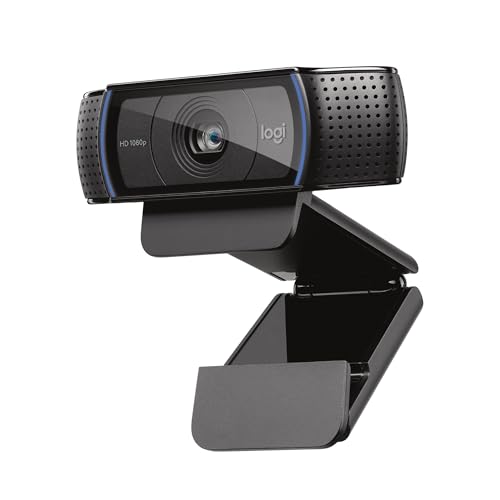
Logitech C920s HD Pro
⭐ 4.5 (85,000+ reviews)
The Logitech C920s is the most proven webcam on the market — used by millions of remote workers, streamers, and content creators for over a decade. It delivers sharp 1080p/30fps video, reliable autofocus, and a dual-microphone array that sounds surprisingly good for calls. The privacy shutter addresses security concerns for always-on setups.
⭐ Why we pick this: Millions of units sold, universal USB-A/C compatibility, and a dual-mic array that outperforms most laptop microphones — the safest webcam recommendation at any price.
Pros
- ✓Proven 1080p/30fps video quality
- ✓Dual stereo microphones
- ✓Privacy shutter included
- ✓Works with Zoom, Teams, Meet out of the box
- ✓Clip-mount fits monitors and laptops
Cons
- ✗30fps only (no 60fps mode)
- ✗Struggles in very dark rooms
- ✗Autofocus speed is average
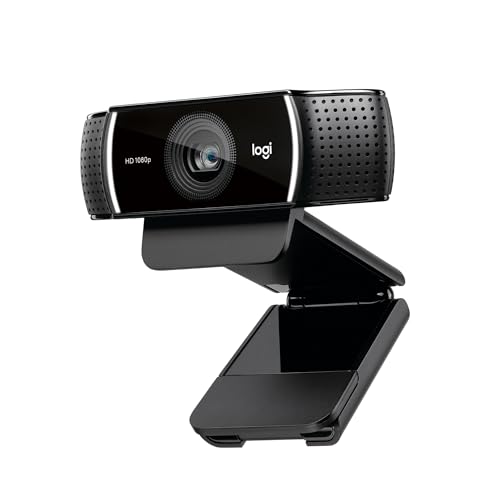
Logitech C922x Pro Stream
⭐ 4.5 (42,000+ reviews)
The C922x adds 1080p/60fps and background replacement capabilities to the proven C920 platform. The 60fps mode makes fast movements look smooth and natural on stream or in video calls. XSplit Premium and background replacement licenses are included, making it a complete streaming package out of the box.
⭐ Why we pick this: The only webcam under $100 offering 1080p/60fps — the difference in motion smoothness is visible immediately when you move your hands or gesture on camera.
Pros
- ✓1080p at 60fps
- ✓Background replacement license included
- ✓Fast, accurate autofocus
- ✓Tripod-compatible mount
- ✓Excellent low-light performance
Cons
- ✗Slightly bulkier than C920s
- ✗Background removal is software-based (needs fast PC)
- ✗No privacy shutter

Razer Kiyo
⭐ 4.3 (28,000+ reviews)
The Razer Kiyo's unique selling point is its built-in ring light — a continuous LED ring around the lens that provides even, flattering facial lighting regardless of your room conditions. It's the best choice for home offices with poor overhead lighting or anyone who wants to look consistently well-lit on calls without buying a separate ring light.
⭐ Why we pick this: The built-in ring light eliminates the single biggest problem with working from home webcams — uneven or poor room lighting — without requiring a separate lighting setup.
Pros
- ✓Built-in ring light for consistent lighting
- ✓1080p/30fps or 720p/60fps
- ✓Wide 81.6° field of view
- ✓Plug-and-play with Zoom and Teams
- ✓Adjustable brightness on ring light
Cons
- ✗Ring light can look artificial at full brightness
- ✗No privacy shutter
- ✗Software (Razer Synapse) requires install for full control

Anker PowerConf C200
⭐ 4.4 (12,000+ reviews)
The Anker PowerConf C200 punches well above its $50 price tag with 2K resolution, AI-powered auto-framing, and a built-in noise-canceling microphone. It's the best webcam under $60 by a significant margin — most competitors at this price deliver blurry 720p video, while the C200 produces sharp, detailed 2K imagery.
⭐ Why we pick this: 2K resolution and AI auto-framing at $50 — the kind of spec sheet that would have cost $150 three years ago, now accessible at the entry-level price point.
Pros
- ✓2K resolution for $50
- ✓AI auto-framing keeps you centered
- ✓Built-in noise-canceling microphone
- ✓Privacy cover included
- ✓USB-C and USB-A adaptor included
Cons
- ✗AI framing requires software (AnkerWork app)
- ✗Colors slightly cooler than Logitech
- ✗60fps only available at 1080p, not 2K
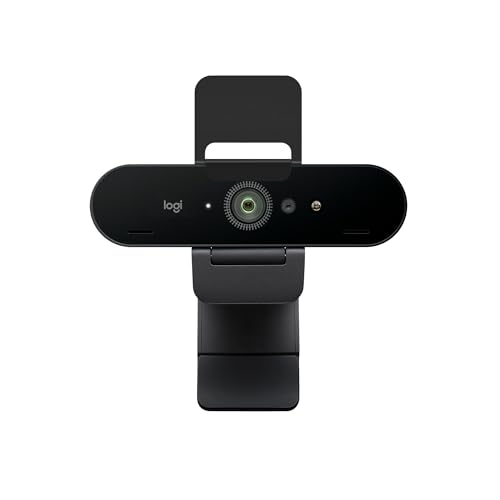
Logitech Brio 4K
⭐ 4.4 (30,000+ reviews)
The Logitech Brio 4K is the best webcam for content creators and executives who need the highest quality video for recordings, presentations, and on-camera appearances. It shoots genuine 4K at 30fps or 1080p at 60fps, supports HDR, and includes Windows Hello facial recognition. The image quality is in a different league from every other webcam under $200.
⭐ Why we pick this: True 4K HDR video with Windows Hello facial recognition — the highest-quality webcam under $200, and the go-to choice for anyone who is regularly on camera for professional purposes.
Pros
- ✓4K/30fps or 1080p/60fps
- ✓HDR support
- ✓Windows Hello IR authentication
- ✓RightLight 3 auto-light correction
- ✓Field of view adjustable: 65°, 78°, 90°
Cons
- ✗4K is overkill for basic Zoom calls
- ✗Most expensive pick on this list
- ✗Large size compared to budget webcams
Our verdict
For most remote workers, the Logitech C920s at $70 is the safe, proven choice — it makes you look noticeably sharper and more professional on video calls with zero setup. Budget-conscious buyers should start with the Anker C200 at $50 for its surprising 2K quality. Anyone with poor room lighting should invest in the Razer Kiyo for its built-in ring light. Streamers and content creators should jump to the C922x for 1080p/60fps. Professionals who are frequently on camera for clients or presentations will appreciate the Logitech Brio 4K's HDR image quality.
Frequently asked questions
What is the best webcam for Zoom calls?
Do I need a 4K webcam for video calls?
How do I improve my webcam quality for Zoom?
Are laptop webcams good enough for working from home?
Prices may vary. Check Amazon for current pricing.