Best Laptop Stands for Desk Use (2026)
⚠️ Price notice: Prices shown are approximate and subject to change. Always check Amazon for the current price before purchasing.
We may earn a commission from qualifying purchases made through our Amazon links. Disclosure.
The best adjustable laptop stands to improve posture and reduce neck strain — compared for stability, portability, and build quality.
Working at a laptop without a stand forces you to look 15–20 degrees downward for hours at a time — directly causing neck and upper back pain. A laptop stand raises your screen to eye level in 30 seconds. Combined with an external keyboard and mouse, it transforms a laptop into a proper ergonomic workstation. These are the best stands in 2026 from $20 to $50.
What to look for
Height and Angle Adjustment
Look for at least 6 inches of height range and multiple angle settings. Eye level for most seated users is 20–28 inches from the desk. A stand that only raises to 5–6 inches won't reach eye level for most people.
Stability
A wobbling stand is worse than no stand. Heavy bases, rubberized grips, and locking hinges prevent movement. Test reviews specifically for reports of wobble at maximum height.
Laptop Size Compatibility
Check the maximum supported laptop size. Most stands hold 11–17 inch laptops. Make sure the tray width accommodates your specific laptop — MacBook 16-inch and large gaming laptops need wider trays.
Portability
Foldable stands that fit in a laptop bag are worth the premium if you work from multiple locations. Fixed desk stands are more stable and often cheaper.
Ventilation
Stands with open designs or large cutouts allow airflow under your laptop — important for sustained performance and thermal management under heavy loads.
Our top picks

Ergotron LX Arm Laptop Mount
⭐ 4.7 (5,400+ reviews)
Ergotron's LX arm clamps to your desk and holds your laptop at any height or angle, fully articulating. This isn't a stand — it's a full mount that frees up desk space and gives you infinite positioning. Used alongside a monitor arm, it creates the cleanest, most ergonomic dual-screen desk setup available.
⭐ Why we pick this: For permanent desk use, a monitor arm completely removes the laptop from your desk surface and puts it exactly at eye level — no stand wobble, maximum desk space.
Pros
- ✓Infinite height and angle adjustment
- ✓Frees up all desk surface space
- ✓Supports up to 11 lbs
- ✓Smooth spring-balanced arm
- ✓7-year Ergotron warranty
Cons
- ✗Requires a compatible tray/adapter for your laptop
- ✗Permanent desk installation
- ✗High price at $140

Nexstand K2 Laptop Stand
⭐ 4.4 (12,800+ reviews)
The Nexstand K2 folds flat, weighs 300g, and fits in any laptop bag — but opens to a stable, adjustable stand that raises your laptop 5–15cm. Nine height positions accommodate sitting at a desk or working on a couch. The hinge locks firmly at each setting without any wobble under normal use.
⭐ Why we pick this: The most portable stable laptop stand available. Sub-400g, folds flat to the size of an A4 sheet, and raises to a genuine working height.
Pros
- ✓Folds completely flat
- ✓9 height settings (5–15cm)
- ✓Stable locking hinge
- ✓300g — ultralight
- ✓Compatible with laptops up to 17 inches
Cons
- ✗Lower maximum height than desk stands
- ✗Less stable than heavier fixed stands
- ✗Minimal ventilation
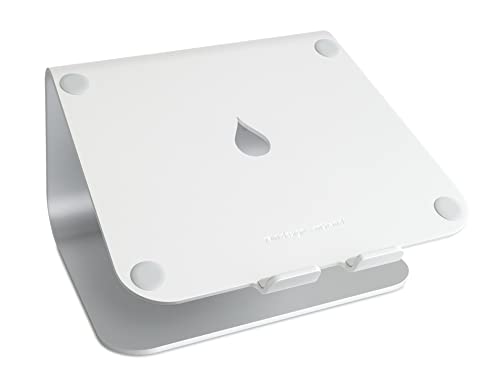
Rain Design mStand
⭐ 4.7 (16,200+ reviews)
Rain Design's mStand is machined aluminum and sized specifically to match Apple MacBook dimensions. The elevated position aligns with the top of most monitors for perfect dual-screen ergonomics. The integrated cable management channel routes charging and peripheral cables through the stand's base. An iMac/MacBook design staple since 2007.
⭐ Why we pick this: The cleanest-looking laptop stand for Mac setups — built to match Apple's aluminum aesthetic with integrated cable management that most stands ignore.
Pros
- ✓Solid aluminum construction
- ✓Integrated cable management
- ✓Perfect height for pairing with 24-27 inch monitors
- ✓Rubber padding protects laptop bottom
- ✓No tools required
Cons
- ✗Fixed height (no adjustment)
- ✗MacBook-sized — larger gaming laptops won't fit cleanly
- ✗Non-foldable
Our verdict
For a permanent home office desk, the Rain Design mStand (Mac) or a monitor arm mount is the cleanest solution. For portability and travel, the Nexstand K2 is unmatched. The Ergotron LX arm is the premium choice for users who want to eliminate the laptop from their desk surface entirely.
Frequently asked questions
At what height should a laptop screen be for ergonomics?
Do I need a separate keyboard with a laptop stand?
Can a laptop stand damage my laptop?
Is a monitor arm better than a laptop stand?
Prices may vary. Check Amazon for current pricing.