Best Ergonomic Mice for Wrist Pain (2026)
⚠️ Price notice: Prices shown are approximate and subject to change. Always check Amazon for the current price before purchasing.
We may earn a commission from qualifying purchases made through our Amazon links. Disclosure.
The best vertical and ergonomic mice to reduce wrist strain — reviewed for comfort, precision, and long-day usability.
Wrist pain from mouse use is one of the most common and most preventable computer-related injuries. Standard flat mice force your hand into an unnatural pronated position (palm-down) for hours at a time. Vertical and ergonomic mice return your hand to a natural handshake position, dramatically reducing ulnar deviation and forearm tension. These are the best options in 2026.
What to look for
Vertical vs. Ergonomic Shape
Vertical mice hold your hand in a handshake grip (thumb up) — the most effective posture for reducing pronation strain. Traditional ergonomic shapes (like MX Master) are less aggressive but feel more familiar. If you have existing wrist pain, go vertical. If you're preventing future pain, either works.
Size and Hand Fit
An ergonomic mouse that doesn't fit your hand is useless. Measure your hand from middle fingertip to wrist — under 18cm is small, 18–20cm is medium, over 20cm is large. Check manufacturer sizing guides before purchasing.
DPI and Tracking
For office work, 800–1600 DPI is the useful range. Optical sensors on glass are now common even on budget mice. Gaming-grade precision matters less for office use — focus on shape and comfort.
Wireless Freedom
A wireless ergonomic mouse eliminates cable drag — important because cable resistance can cause you to grip and move the mouse more aggressively, increasing strain. Bluetooth + USB dongle options give you maximum flexibility.
Button Layout
Back/forward thumb buttons are essential for browser workflow. A scrolling tilt wheel is useful for horizontal scrolling in spreadsheets. Avoid mice with buttons in awkward positions that require twisting your hand to reach.
Our top picks
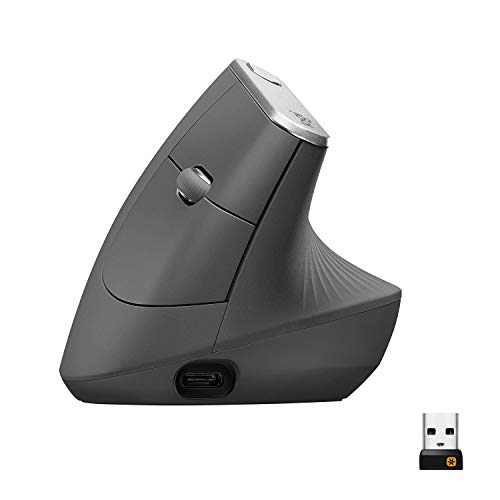
Logitech MX Vertical
⭐ 4.4 (22,000+ reviews)
The Logitech MX Vertical is the gold standard for ergonomic mice. The 57-degree vertical angle is clinically validated to reduce muscle strain by 10% compared to a standard mouse. It uses Logitech's Elite optical sensor, supports Easy-Switch between 3 devices, and recharges via USB-C in under 3 hours for a full day's use.
⭐ Why we pick this: The only mouse in this guide with published clinical data backing its ergonomic claims. Logitech's build quality and multi-device support make it worth the premium.
Pros
- ✓57° vertical angle reduces forearm muscle strain
- ✓Easy-Switch between 3 devices
- ✓Elite optical sensor (4000 DPI)
- ✓USB-C rechargeable
- ✓Logitech Options+ software for full customization
Cons
- ✗No right-hand/left-hand version (right-hand only)
- ✗Premium price at $80
- ✗Scroll wheel is basic vs. MX Master
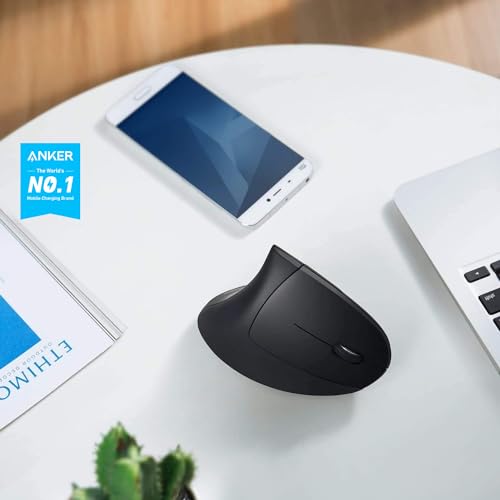
Anker Ergonomic Optical USB Mouse
⭐ 4.3 (35,000+ reviews)
Anker's vertical mouse proves you don't need to spend $80 to get wrist relief. The vertical grip angle is comparable to the MX Vertical, the optical tracking is reliable for office use, and the build quality is solid for $25. If you're unsure whether a vertical mouse will work for you, this is the perfect starting point.
⭐ Why we pick this: The best entry point to vertical mice — identical ergonomic angle to premium options at a fraction of the cost. Try it before investing in a $80 version.
Pros
- ✓Genuine vertical grip at budget price
- ✓No software required, plug and play
- ✓5 DPI levels (800–2400)
- ✓Forward/back thumb buttons
- ✓Available in multiple sizes
Cons
- ✗No wireless option
- ✗Scroll wheel clicks are loud
- ✗No software customization
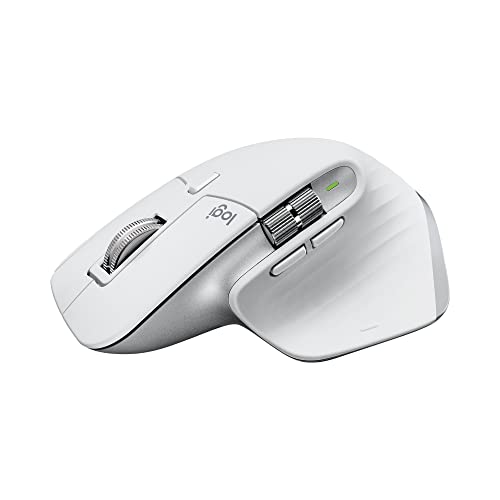
Logitech MX Master 3S
⭐ 4.7 (18,500+ reviews)
The MX Master 3S isn't a vertical mouse, but it's the best traditional ergonomic mouse available. The sculpted right-hand shape, near-silent magnetic scroll wheel, thumb rest, and horizontal scroll wheel make it exceptional for all-day productivity. If a vertical mouse feels too foreign, this is the answer.
⭐ Why we pick this: The best mouse for users who want ergonomic benefits without the vertical learning curve — Logitech's premium shape and near-silent scroll wheel are worth it.
Pros
- ✓Near-silent MagSpeed scroll wheel
- ✓Horizontal scroll wheel for spreadsheets
- ✓USB-C charging, 70-day battery
- ✓8000 DPI Darkfield sensor (works on glass)
- ✓Easy-Switch between 3 devices
Cons
- ✗Not a vertical design
- ✗Right-hand only
- ✗Premium price at $90
Our verdict
Start with the Anker vertical mouse if you've never tried one — the vertical learning curve takes 3–5 days and costs you only $25. If you're already convinced, the Logitech MX Vertical is the long-term investment. Power users who prefer traditional ergonomic shapes should go straight to the MX Master 3S.
Frequently asked questions
Do vertical mice actually help with wrist pain?
How long does it take to adjust to a vertical mouse?
Can a mouse cause carpal tunnel syndrome?
Should I use a wrist rest with an ergonomic mouse?
Prices may vary. Check Amazon for current pricing.